> For the complete documentation index, see [llms.txt](https://nxp.gitbook.io/vmu-rt1176/llms.txt). Markdown versions of documentation pages are available by appending `.md` to page URLs; this page is available as [Markdown](https://nxp.gitbook.io/vmu-rt1176/tropic/burning-fuses-on-imxrt1064-mr-vmu-tropic.md).

# Burning fuses on iMXRT1064 (MR-VMU-TROPIC)

Updated 8/11/2026

Burning fuses on X-MR-VMU-TROPIC, These are pre-production versions of a board that will be released on NXP.com.

Note some screenshots shown are copied from the IMXRT1176 guide elsewhere in this document, but process is quite similar. If you see "RT1176" just replace it with RT1064\ <br>

{% hint style="warning" %}
QGC (QGroundControl) supports TROPIC as of version 5.1.0 , you will need to use at least this version or later in order to use QGC to bootload firmware to the board. (noted August 2026)
{% endhint %}

&#x20;

Install NXP Mcuxpresso secure provisioning

&#x20;

<https://www.nxp.com/design/software/development-software/mcuxpresso-software-and-tools-/mcuxpresso-secure-provisioning-tool:MCUXPRESSO-SECURE-PROVISIONING#downloads>

&#x20;

Start secure provisioning

{% hint style="warning" %}
**Select MIMXRT1064 instead of RT1176**
{% endhint %}

<figure><img src="https://2727163534-files.gitbook.io/~/files/v0/b/gitbook-x-prod.appspot.com/o/spaces%2FCjtagJvJqLjd2arsEF0L%2Fuploads%2FPMxtxB1Qpia8wsizQnIt%2Fimage.png?alt=media&amp;token=504a8003-88b2-4f26-850c-9194c321808f" alt=""><figcaption></figcaption></figure>

Select create

<figure><img src="https://2727163534-files.gitbook.io/~/files/v0/b/gitbook-x-prod.appspot.com/o/spaces%2FCjtagJvJqLjd2arsEF0L%2Fuploads%2FjsjNuAXdGsPHh9q1sRzI%2Fimage.png?alt=media&amp;token=3c28e666-3ee7-40dd-ac0a-75cc67619d26" alt=""><figcaption></figcaption></figure>

Select OTP configuration

<figure><img src="https://2727163534-files.gitbook.io/~/files/v0/b/gitbook-x-prod.appspot.com/o/spaces%2FCjtagJvJqLjd2arsEF0L%2Fuploads%2Fo3MVbaMuAWYzclo5KjtR%2Fimage.png?alt=media&amp;token=859bffef-dfab-4bb0-8234-f56e4c8c8ee6" alt=""><figcaption></figcaption></figure>

Press Yes

Wait for the script to finish

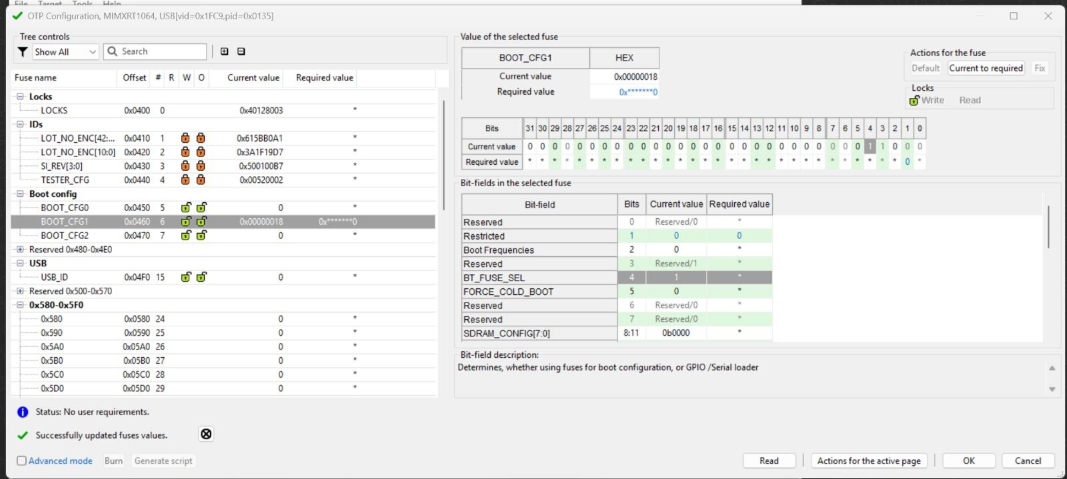
Select "BOOT\_CFG1"

Fuse BOOT\_CFG1

<figure><img src="https://2727163534-files.gitbook.io/~/files/v0/b/gitbook-x-prod.appspot.com/o/spaces%2FCjtagJvJqLjd2arsEF0L%2Fuploads%2FhsMcArCfWIFvS9Bl7p2M%2Fimage.png?alt=media&amp;token=b5ea623c-b641-4e2a-92ab-dd76cf20de48" alt=""><figcaption></figcaption></figure>

BT\_FUSE\_SEL select Required value 1\
\
Bottom-left corner and select advanced mode

<figure><img src="https://2727163534-files.gitbook.io/~/files/v0/b/gitbook-x-prod.appspot.com/o/spaces%2FCjtagJvJqLjd2arsEF0L%2Fuploads%2FMwiqQTY5j0FP1DKvnJEr%2Fimage.png?alt=media&amp;token=7e8f2b6d-a1e6-4ea8-a687-6d1dd0dbd14c" alt=""><figcaption></figcaption></figure>

<figure><img src="https://2727163534-files.gitbook.io/~/files/v0/b/gitbook-x-prod.appspot.com/o/spaces%2FCjtagJvJqLjd2arsEF0L%2Fuploads%2FiE61jwuh3tFdRn5TJCqG%2Fimage.png?alt=media&amp;token=4fd605af-b018-4287-90cb-08dec6365983" alt=""><figcaption></figcaption></figure>

&#x20;

Press close

&#x20;Press generate script

<figure><img src="https://2727163534-files.gitbook.io/~/files/v0/b/gitbook-x-prod.appspot.com/o/spaces%2FCjtagJvJqLjd2arsEF0L%2Fuploads%2FENL3Vdq2iU7V02KdLJRs%2Fimage.png?alt=media&amp;token=6b95bf87-5312-4edc-b60c-3953a244d891" alt=""><figcaption></figcaption></figure>

\
{workspace} is C \ users \ $username \ secure provisioning

There's a burn\_user\_OTP\_cfg\_win.bat\ <br>

<figure><img src="https://2727163534-files.gitbook.io/~/files/v0/b/gitbook-x-prod.appspot.com/o/spaces%2FCjtagJvJqLjd2arsEF0L%2Fuploads%2FoBo9bgyvDbEMdmNM8W6G%2Fimage.png?alt=media&amp;token=3ec1b164-5969-404a-a0a1-49240520447d" alt=""><figcaption></figcaption></figure>

You can use to burn fuses for new boards

&#x20;