> For the complete documentation index, see [llms.txt](https://nxp.gitbook.io/navqplus/llms.txt). Markdown versions of documentation pages are available by appending `.md` to page URLs; this page is available as [Markdown](https://nxp.gitbook.io/navqplus/hardware/hardware-interfaces/uart/uart3.md).

# UART3 (SPI)

## Introduction

UART3 is available for general use. Hardware flow control is supported.

Note from the schematic clip below, that the MPU can multiplex these signals with SPI1. This is normally configured in the Linux image and is not the default configuration.

## UART3 Interface voltage

The signaling from the SOM to the NavQPlus carrier board on J9 is at 3V3 but the Murata 1ZM expects 1.8V. The level conversion is done using U26.

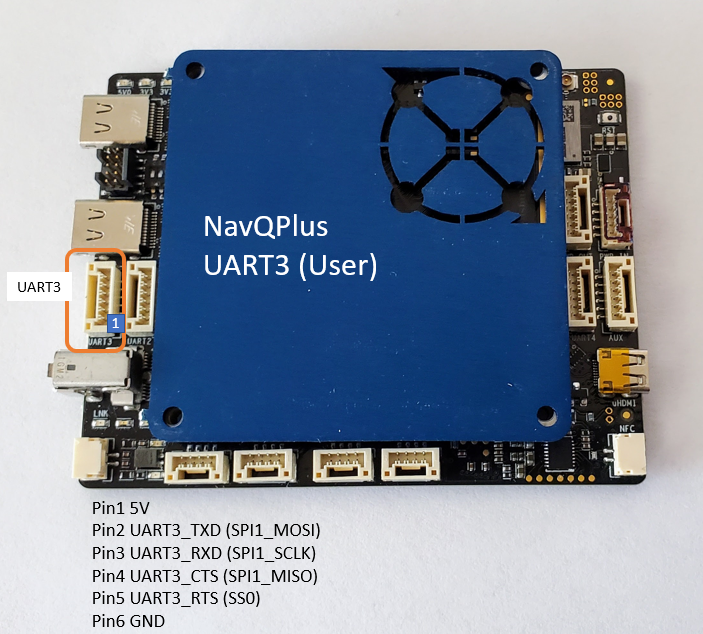
## UART3 Locator

<figure><img src="/files/ulqxvBMKbgMLrcn07GHi" alt=""><figcaption><p>UART3</p></figcaption></figure>

## Schematic

<figure><img src="/files/Z99xjFfq1mNTHEEzFmHw" alt=""><figcaption><p>UART3/ SPI 1 interface on J9</p></figcaption></figure>

All the UART signals are protected from ESD using the Nexperia IP4292CZ components. This is part of an optimized BOM as they are also required for the USB interfaces. In additional to its exceptional performance the board layout may be optimized because of being able to route traces straight under the component. <br>

<figure><img src="/files/DF4wMx9QuZzKVVTxqBQM" alt=""><figcaption></figcaption></figure>

<figure><img src="/files/T5DBPn73zlsMdKK65ilC" alt=""><figcaption><p>ESD Protection components on UARTS</p></figcaption></figure>

## Software

~~UART3 may be accessed as a standard `/dev/ttyS_` in Linux.~~\
UART3 may be accessed /dav/ttymxc2 in linux\
\<TODO-check wich ttyS number it is>&#x20;

##


---

# Agent Instructions
This documentation is published with GitBook. GitBook is the documentation platform designed so that both humans and AI agents can read, navigate, and reason over technical content effectively. Learn more at gitbook.com.

## Querying This Documentation
If you need additional information that is not directly available in this page, you can query the documentation dynamically by asking a question.

Perform an HTTP GET request on the current page URL with the `ask` query parameter, and the optional `goal` query parameter:

```
GET https://nxp.gitbook.io/navqplus/hardware/hardware-interfaces/uart/uart3.md?ask=<question>&goal=<endgoal>
```

`ask` is the immediate question: it should be specific, self-contained, and written in natural language.
`goal` is optional and describes the broader end goal you are ultimately trying to accomplish on behalf of the user. GitBook uses it to tailor the answer towards what is most useful for that goal.

The response will contain a direct answer to the question and relevant excerpts and sources from the documentation.

Use this mechanism when the answer is not explicitly present in the current page, you need clarification or additional context, or you want to retrieve related documentation sections.